3D configurator or 3D viewer: differences, prices and which one your catalog needs
· 6 min read
If your product is fixed, a 3D viewer is enough; if your customers customize it, you need a configurator. Here is how to decide and what each one costs.
Short answer: a 3D viewer shows a product that is already defined: customers rotate it, zoom in and, if you want, see it in their own space with augmented reality. A 3D configurator lets them build it: customers pick colors, materials, parts or sizes, see the result instantly and can only choose combinations that can be manufactured. If you sell a catalog of fixed products, start with a viewer. If every order is a different combination, you need a configurator.
The line isn't always that clear, so below you'll find a comparison table, examples by sector, what drives the cost of each option and a checklist to decide.
What a 3D viewer is
It is a product page in three dimensions. It runs in the browser, on mobile and desktop, with nothing to install, and replaces or complements photos: 360° rotation, zoom, hotspots on each part, animations that show how it opens or assembles and, optionally, augmented reality to place the product in the customer's own home or warehouse. It can include a simple change of finish, but the product you see is the product you buy.
What a 3D configurator is
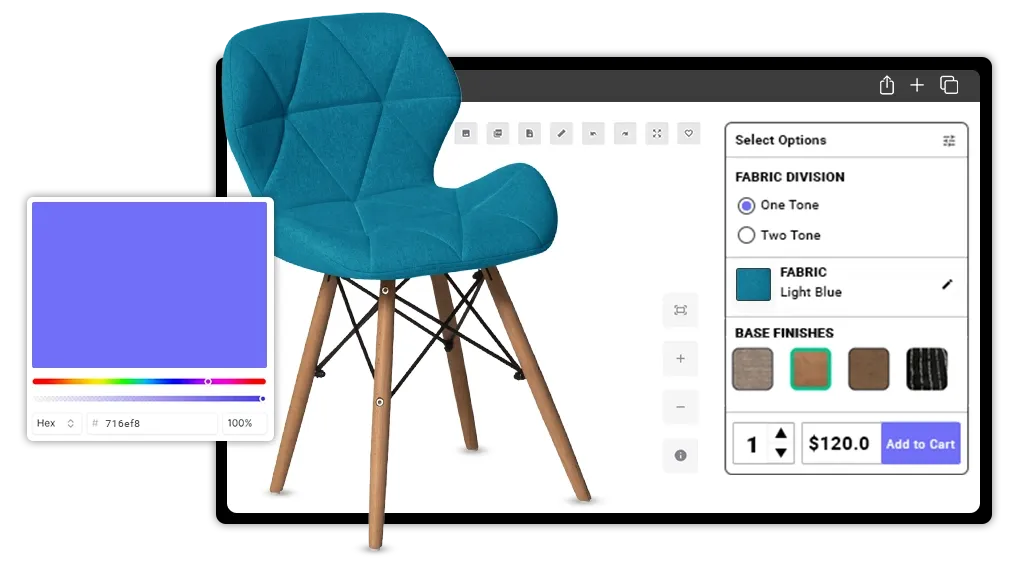
It is a viewer with rules. Besides showing the model, it knows which parts are compatible, recalculates the price with every change and can end in a cart, a PDF quote or an order in your ERP. It is the tool for made-to-order products, where the problem is not only that customers see the product, but that they define it correctly and the order arrives without mistakes.
The differences in a table
| 3D viewer | 3D configurator | |
|---|---|---|
| What it is for | Showing products that are already defined | Letting customers customize the product |
| What the customer does | Rotates, zooms, sees it in AR | Picks options and sees the result and the price |
| Compatibility rules | No | Yes: only buildable combinations |
| Price and quote | Usually doesn't calculate a price | Real-time price, PDF or cart |
| Typical integrations | Your store's product page | Online store, ERP or CRM |
| Fixed-price pilot | A simple viewer for 1 product, 2 weeks | 1 object with 2 configurable parameters, 4 weeks |
When a 3D viewer fits
- You have a catalog of fixed references and want them understood better than with photos.
- Your product is large, expensive or hard to transport, and today you take samples to trade shows or to the customer.
- You want customers to check size and fit in their space before buying (AR).
- You need to explain how something works inside: a machine, a mechanism, an assembly.
- You want to cover many products on a contained budget: each extra product adds little to the project beyond its modeling.
When a 3D configurator fits
- Every order is a different combination of sizes, materials, colors or modules.
- Your sales team loses time quoting combinations by hand.
- Orders arrive with combinations that can't be manufactured and have to be redone.
- You want customers to end up with an order or a quote without needing a call.
- The price depends on what is chosen and you want it calculated automatically and without errors.
Examples by sector
- Furniture and interiors: a catalog of fixed-model chairs or lamps fits a viewer; a modular sofa or a kitchen with sizes and finishes to choose from, a configurator.
- Industrial machinery: to show equipment at trade shows or explain its maintenance, a viewer with an exploded view; if it is sold with accessories and versions that change the price, a configurator.
- Building materials and ceramics: seeing a finish on a surface is a viewer; combining formats, colors and joints for a project with a quote is a configurator.
- Bicycles, vehicles and equipment: a fixed model is shown in a viewer; choosing frame, color, wheels and components is a configurator.
- Packaging, signage and personalized products: if customers change sizes, colors or text, it is almost always a configurator.
What each one costs
In a 3D viewer the cost is driven mainly by the number of products, augmented reality and the integration into your online store's product pages. In a 3D configurator what weighs is the number of products and options, plus integrations such as the online store or the ERP. That is why, for the same catalog, a configurator always costs more than a viewer.
In both cases, add 3D modeling if you don't have models: starting from your CAD, FBX or OBJ is the cheapest; if we model it from scratch, advanced modeling (with animation, physics or modular parts for a configurator) costs more than basic. The 3D configurator page details that option.
It is not a decision for life. Both use the same 3D models, usually in glTF, an open, royalty-free format that is the ISO/IEC 12113:2022 standard. If you start with a viewer and later want a configurator, the models you already paid for are reused.
A checklist to decide
Answer yes or no. If you tick two or more of the first four, you probably need a configurator; if not, start with a viewer.
- Do customers choose between options that change the product (sizes, parts, materials)?
- Are there combinations that can't be manufactured and that you want to prevent?
- Does the price change depending on what is chosen?
- Do you want the tool to produce a quote, an order or an entry in your ERP?
- Do you have many products and would rather cover them all than configure one in depth?
- Is today's biggest problem that customers can't picture the product, its size or how it works?
- Do you already have CAD models we can reuse? (It lowers the cost in both cases.)
If you are still unsure, the cheapest way out of doubt is a pilot: the viewer pilot (a simple viewer for 1 product, 2 weeks) or the configurator pilot (1 object with 2 configurable parameters, 4 weeks). Both are fixed-price and deducted from the project if we carry on. You'll find them in how to get started, or tell us about your catalog in a free call and we'll recommend one or the other.